
Navigation Tutorial Guide for E-Learning Platform
Introduction
Welcome to Male Childcare & Teaching Jobs’ E-Learning platform designed to enhance your educational experience and facilitate seamless learning at your own pace. Whether you’re here to acquire new skills, refresh your knowledge, or embark on a journey of continuous learning, our platform is tailored to meet your needs.
This guide serves as a comprehensive roadmap to navigate through Male Childcare & Teaching Jobs. Whether you’re a first-time visitor or a returning learner, this tutorial will walk you through all the essential features, ensuring you make the most out of what we offer.
Understanding and familiarising yourself with our platform is paramount. Just as a well-organised workspace can boost productivity, a well-understood e-learning environment can greatly enhance your learning experience. By taking a few moments to go through this guide, you’re setting yourself up for a smoother, more intuitive, and productive learning journey.
We encourage every user to peruse this guide, ensuring that each feature of Male Childcare & Teaching Jobs is utilised to its full potential. Let’s embark on this journey together!
Getting Started
Navigating a new platform can be daunting, but with Male Childcare & Teaching Jobs, we aim to make the process straightforward and intuitive. This section will guide you through the initial steps to get you up and running.
Login & Registration
Registering for a New Account:
- Navigate to the top right corner of the homepage and click on “Sign In.”

- You will be presented with a login form. Scroll down the page and click on “Create a New Account”.
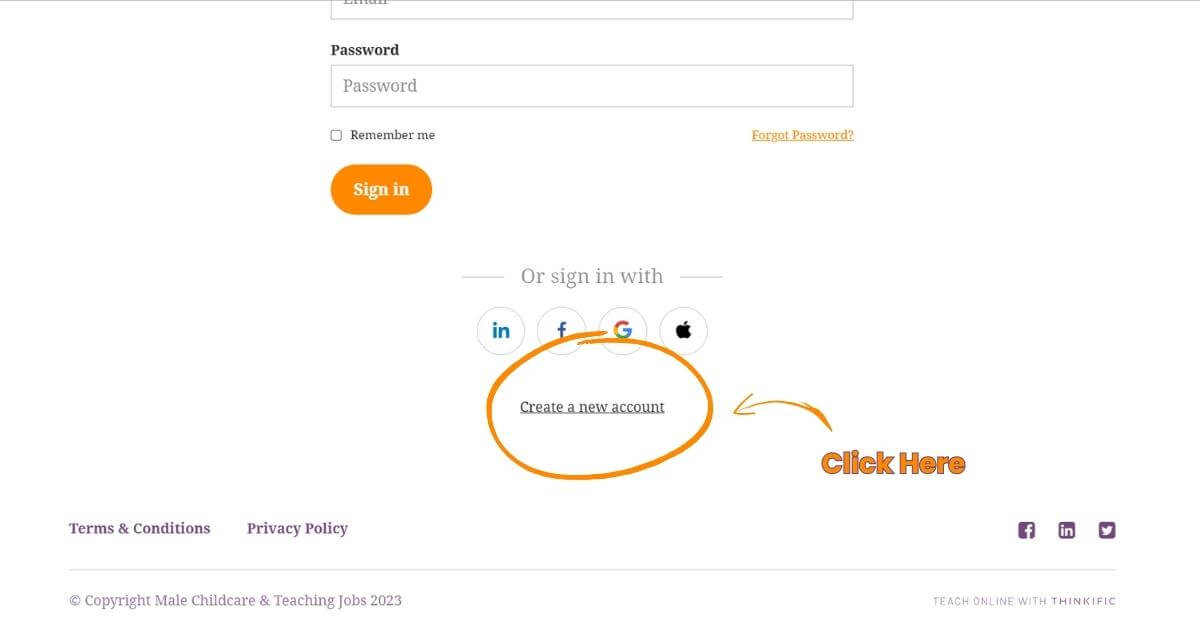
- Fill in the necessary details such as your name, email address, and preferred password. Ensure your password is strong, combining letters, numbers, and special characters. Once filled, click on the “Sign Up” button.

- An email confirmation will be sent to your provided email address.
Logging In:
- Once your account is activated, return to Male Childcare & Teaching Jobs’ homepage.
- Click on the “Sign In” button, located at the top right corner.
- Enter your registered email address and password.
- If you’ve forgotten your password, click on the “Forgot Password?” link. Follow the prompts to reset it.
- After entering your details, click “Sign In” to access your account.
Dashboard Overview
Upon successful login, you’ll land on the Courses & Communities page, the heart of your learning experience, where you’ll be able to view all the available products.

- Overview & Navigation Panel: On the top is the navigation panel, providing quick access to various sections like ” Courses & Communities,” “My Dashboard,” “Settings,” and “Notifications”
- My Dashboard: Based on your previous courses, here you will be able to see which courses you’re currently enrolled in, ensuring your learning stays organised. You will be able to filter courses by status (In Progress, Completed, Expired)

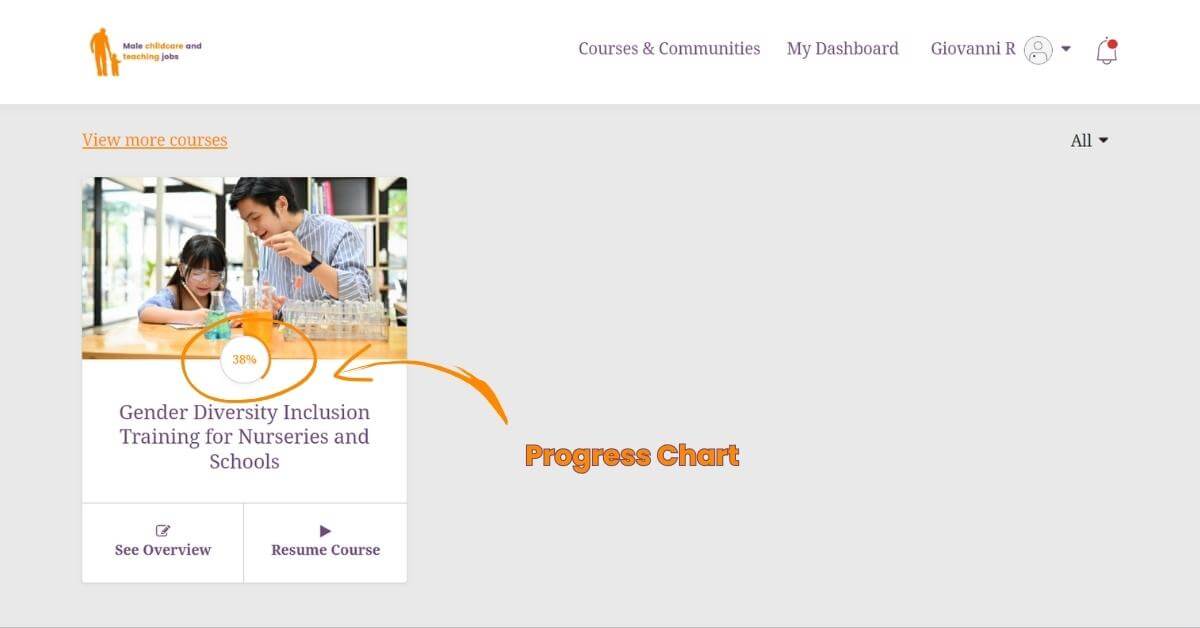
- Progress Chart: Keep track of your learning progress with a visible progress chart, located at the centre of each course tab you are enrolled in (located in your dashboard). This provides a snapshot of your completed courses, ongoing lessons, and achievements.

- Notifications & Updates: Stay updated with any announcements, messages, or course updates through the notification bell/icon, typically found on the top right corner.

- Your dashboard is designed to be a one-stop hub, providing a clear overview of your learning journey and quick access to all essential tools and sections. Familiarise yourself with its layout, ensuring you make the most out of your time on Male Childcare & Teaching Jobs.
Main Features & Navigation
At Male Childcare & Teaching Jobs, we pride ourselves on offering a multitude of features designed to enhance and facilitate your learning journey. This section delves into each core feature, guiding you through its functionalities and ensuring you fully harness what we offer.
Profile & Settings
Accessing Your Profile:
- Navigate to the top right corner and click on your profile picture or username. This will drop down a menu, which directs you to your personal profile page (My Account)

Editing Profile Details:
- Within your profile page, locate and click the “Edit Profile” button.
- Here, you can update details such as profile picture, name, email, and more. Save any changes before navigating away.

Changing Settings & Preferences:
- From your profile, access the “Settings” section on the left side of the page.
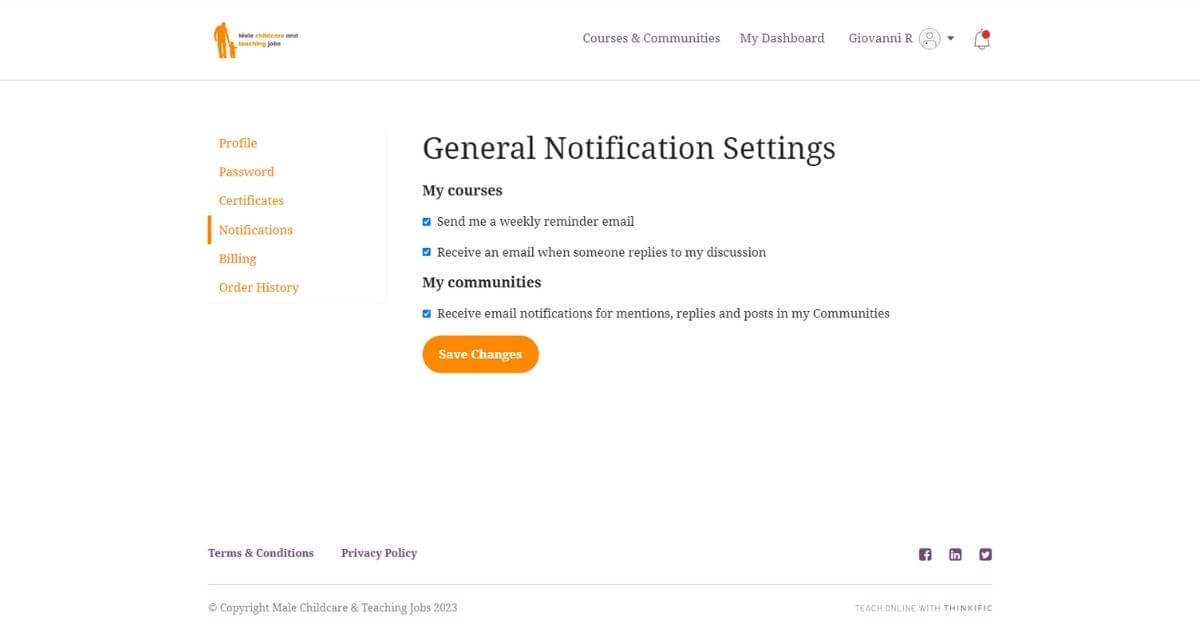
- Adjust your preferences, like notifications, password, and more. Don’t forget to save changes.

Browsing Courses
Searching for Courses
- Navigate to the “Course and Communities” section from the main menu.

- Utilise the search bar by typing in keywords or course titles.

Taking a Course
Starting a Course:
- Click on the desired course title or thumbnail.

- Review the course curriculum and details

- When ready, click “Email Us to Enroll Today.”

- Send us an email to request access to the course
- One of our moderators will evaluate the status of your membership and, if approved, will grant you access.
Navigating Lessons/Modules:
- Once your access is granted, you will be able to keep track of your learning progress with a visible progress chart, located at the centre of each course tab you are enrolled in (located in your dashboard). This provides a snapshot of your completed courses, ongoing lessons, and achievements.
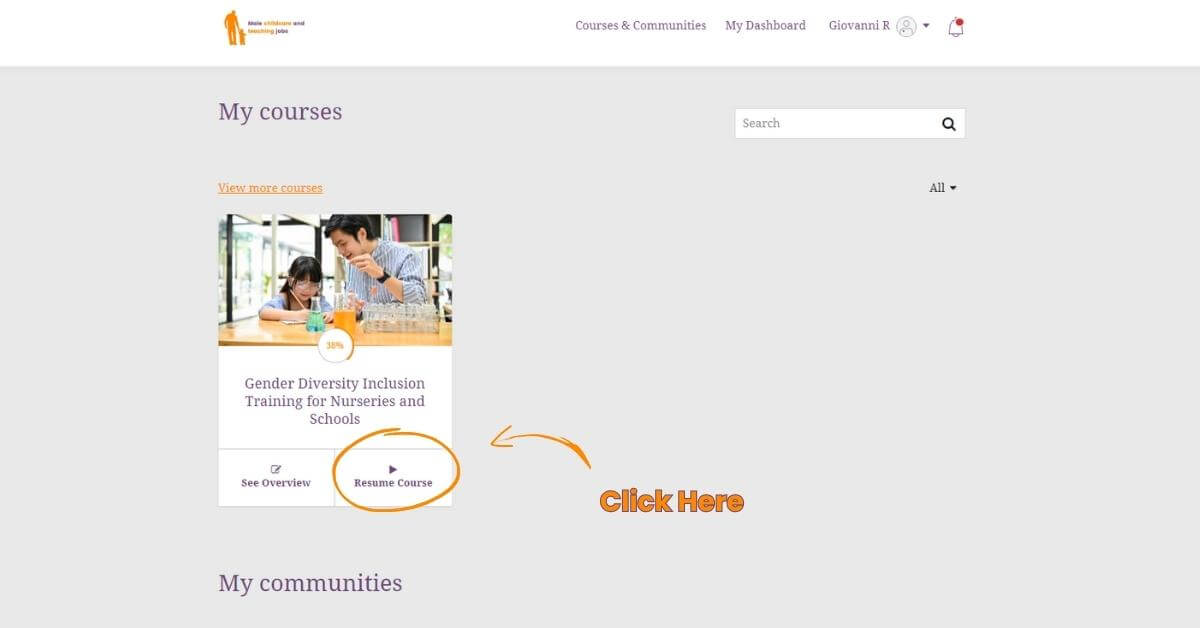
- Click “Resume Course” to Navigate Lessons/Modules
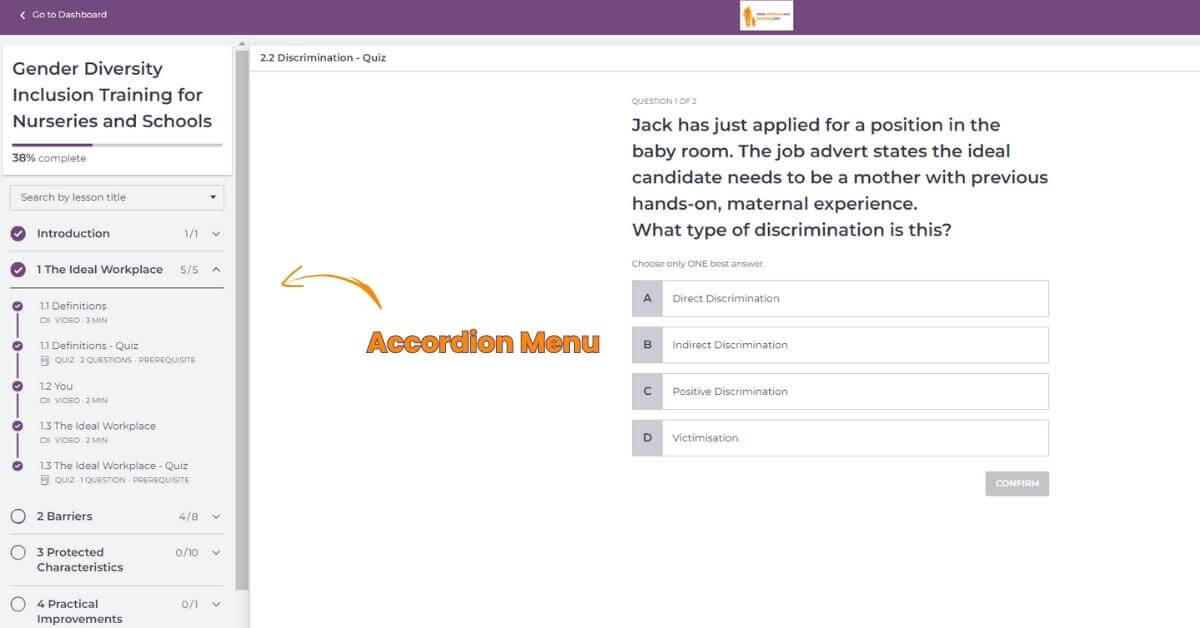
- Courses are broken down into lessons or modules. Navigate between them using the provided course outline in the “Accordion Menu” on the left side of the page.
Tracking Progress:
- Your progress in a course is typically shown as a percentage on the progress bar (Under the course title). Check this regularly to see how much you’ve completed and what remains.

Communicating & Collaborating
Chat & Discussion Features
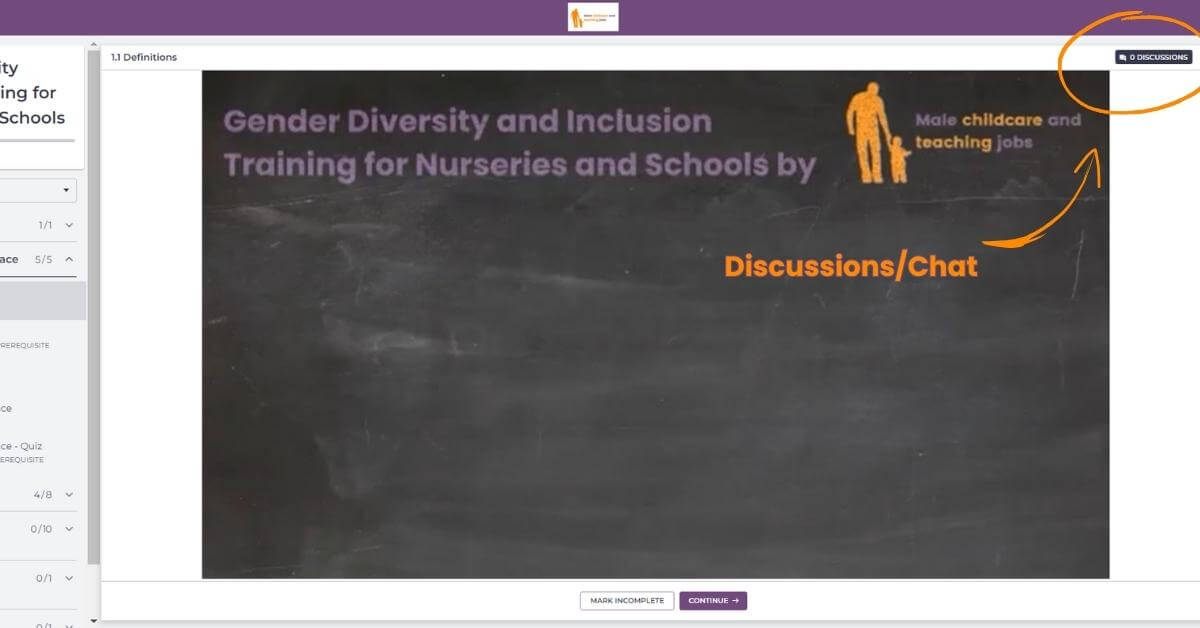
- Engage with fellow learners or instructors using the chat or discussion board features. Access these via the icon within each course on the right side of the page
Joining Groups or Communities
- Explore the “Courses & Communities” section, where you can join interest-based groups or course-related discussions.
- To join a community, select one you might be interested in by clicking on its tab.
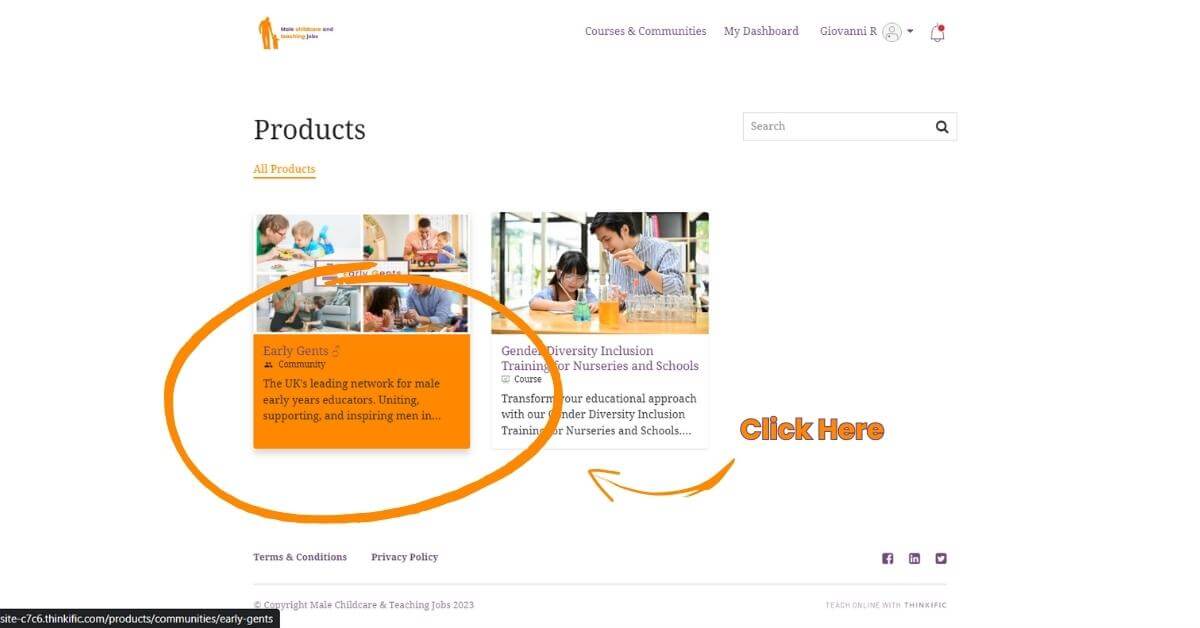
- Once on the community homepage, you can review the community details and request access by clicking “Email us to Join Today”

Quizzes
Locating Quizzes:
- When applicable, quizzes are usually at the end of each lesson, module, or entire course.

Taking & Submitting Quizzes:
- Click on the quiz title to begin. Answer each question and, when done, hit the “Submit” button. Ensure you have a stable internet connection during this process.
Accessing Results & Feedback:
- Once submitted, results are instant. Check your score (you will need a 100% mark to pass. If needed, go through any previous lessons to understand and improve upon your performance.
Additional Resources & Tools
At Male Childcare & Teaching Jobs, we believe in equipping our learners with more than just course content. We strive to offer a holistic learning environment enriched with various tools and resources to supplement your education and ensure you have a well-rounded experience. Here’s an overview of some additional assets you can find on our platform:
Learning Aids
- Downloadable Content/: For several courses, you’ll find downloadable PDFs, cheat sheets, or worksheets to aid your learning. These can be invaluable for offline study or quick referencing.
Reference Library
- E-Books & Articles: Our curated collection of e-books and articles provides in-depth insights on a plethora of topics, available for you to read at your convenience.
External Links & Recommendations
- For those wanting to delve even deeper, we often provide links to external resources, websites, or tools that complement our course material. These are handpicked to ensure they align with our educational standards and offer genuine value.
As you navigate through Male Childcare & Teaching Jobs, always keep an eye out for these additional resources and tools. They can significantly enhance your learning process, ensuring you grasp topics more comprehensively and have access to varied formats that cater to different learning styles.
Troubleshooting & Common Issues
Every technological platform has its moments, and while we’ve made every effort to ensure a smooth experience on Male Childcare & Teaching Jobs, there might be times when you face an issue. This section addresses some of the most common problems and questions users might have, providing quick solutions to get you back on track.
Forgot Password?
- Solution: Click on the “Sign in” button, then select the “Forgot Password?” link below the login form. Enter your registered email address. You’ll receive an email with instructions to reset your password. Follow the given steps, and you’ll regain access in no time.

Course Video Not Playing?
- Solution: Ensure you have a stable internet connection. If the problem persists, try clearing your browser cache or using a different browser. If the issue still remains, please contact our support team at info@malechildcareandteachingjobs.co.uk
Can’t Access a Purchased Course?
- Solution: First, ensure your account was approved by checking your inbox for a confirmation email. If you’ve received the confirmation email but still can’t access the course, try logging out and then back in. If the issue remains unresolved, contact our support team for assistance at info@malechildcareandteachingjobs.co.uk
Notification Settings Overwhelming?
- Solution: You can customise your notification preferences. Head to “My Account” from your profile, and under “Notifications,” adjust the types and frequencies to your liking.
Community Forum Not Loading?
- Solution: This might be due to a temporary server issue or an unstable internet connection. Refresh the page, and if the problem continues, please reach out to our support team at info@malechildcareandteachingjobs.co.uk
Not Receiving Emails from Male Childcare & Teaching Jobs?
- Solution: Check your spam or junk folder. If you find our emails there, mark them as “Not Spam” to receive future emails in your inbox. Also, ensure the email address associated with your account is correct.
Mobile App Crashes?
- Solution: Ensure you have the latest version of the app. If it’s up-to-date but still problematic, try uninstalling and reinstalling the app.
Course Progress Not Saving?
- Solution: This is typically a browser issue. Make sure you’re using a supported browser and have cookies enabled. Logging out and back in might also help.
Questions about Refunds or Course Enrollments?
- Solution: Visit our “FAQ” section for details on our refund policy and course enrollment processes. If your question isn’t addressed there, please contact our support team at info@malechildcareandteachingjobs.co.uk
If your issue isn’t listed above or persists after trying the suggested solutions, please don’t hesitate to reach out to our dedicated support team. We’re here to help and ensure your experience on Male Childcare & Teaching Jobs is nothing short of excellent.
Feedback & Support
At Male Childcare & Teaching Jobs, your feedback is invaluable to us. It enables us to continually refine our offerings, ensuring that we provide the best possible learning experience for all our users. Additionally, we understand that sometimes you may need assistance, and we are here to help. Below, find the necessary information on how to provide feedback and access our support system.
Providing Feedback
- Platform Feedback: Send your feedback to info@malechildcareandteachingjobs.co.uk. We value and review every piece of feedback we receive.
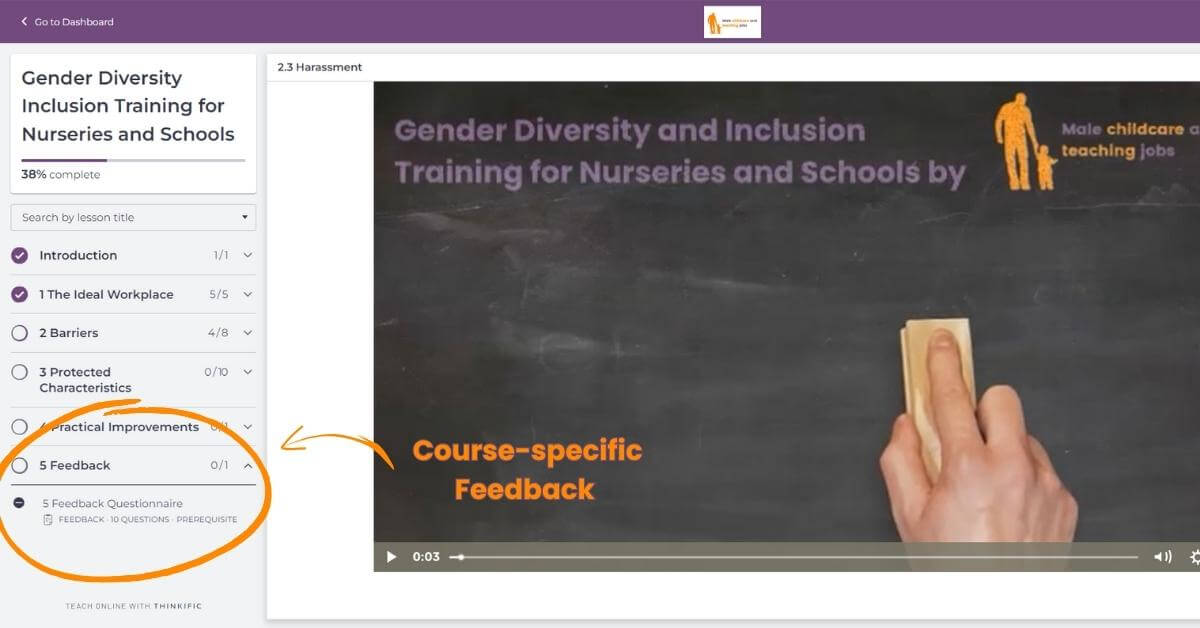
- Course-Specific Feedback: After completing a course, you’ll be prompted to review it with a questionnaire. Please take a moment to provide specific feedback. This helps instructors improve and fellow learners to choose the right courses.
Remember, our goal is to provide you with a seamless experience. If you face any challenges or have suggestions on how we can do better, please reach out. We appreciate your trust in Male Childcare & Teaching Jobs, and we’re here to ensure your journey with us is productive and enjoyable.
Conclusion
Navigating through a new platform can initially seem daunting, but with the tools and resources provided in this guide, we’re confident you’ll quickly become comfortable and proficient in using Male Childcare & Teaching Jobs. Familiarising yourself with the platform is the first step towards maximizing your learning experience, ensuring that you extract the full value from our extensive offerings.
Always remember, Male Childcare & Teaching Jobs was built with you in mind. Every feature, course, and tool is designed to foster an enriching educational journey, and the more you engage with the platform, the more rewarding your experience will be.
However, as with all journeys, there might be moments of uncertainty or challenges. In such times, don’t hesitate to lean on this guide or reach out to our dedicated support team. We’re here to assist and ensure your path to knowledge is smooth and enjoyable.
Finally, we genuinely value your insights and feedback. As you delve deeper into our platform, please share your experiences, suggestions, or concerns. Your voice plays an instrumental role in our continuous evolution and pursuit of excellence.
Thank you for choosing Male Childcare & Teaching Jobs. Here’s to a fruitful and enlightening journey ahead!
Appendix
In this section, we’ve provided supplementary information, a glossary of terms, and references that you might find beneficial as you navigate through Male Childcare & Teaching Jobs. These additional resources are aimed at enhancing your understanding and making your journey even smoother.
Glossary of Terms
- Dashboard: The main page you land on after logging in, which provides an overview of your courses, progress, notifications, and more.
- Module: A section or unit within a course, typically focusing on a specific topic or set of related concepts.
- Lesson: A section or unit within a module, typically focusing on a specific aspect of a topic or set of related concepts
- Quiz: A set of questions, usually following a lesson or module, designed to assess your understanding and retention of the material covered.
- Course: A structured program of study, typically consisting of multiple modules and lessons, focused on a particular subject or skill set.
- Community: A space or platform where learners can connect, share, and discuss topics related to the courses or other interests.
- Chat & Discussion Feature: An interactive tool or section within each course, allowing users to communicate or share thoughts, questions, and feedback about the course content.
Additional References
Resources for Employers
Dive into a comprehensive guide on how to leverage Male Childcare & Teaching Jobs for talent scouting, recruitment, and training. Explore effective strategies and techniques for identifying, interviewing, and onboarding the right talent using our platform’s features. Access specially designed content to upskill your workforce and drive organisational growth. Read real-world stories of other employers who have successfully used our platform to meet their HR and training needs: https://malechildcareandteachingjobs.co.uk/resources-for-employers/
Resources for Jobseekers
Explore a detailed walkthrough on how to effectively use Male Childcare & Teaching Jobs to discover opportunities and enhance your career prospects. Gain expert advice and tools to craft a resume that stands out in the competitive job market. Dive into a comprehensive set of resources, from common interview questions to tips on body language, ensuring you’re always a step ahead in your interview game. Understand various industry roles, growth trajectories, and the skills required to excel in each, helping you make informed career decisions: https://malechildcareandteachingjobs.co.uk/resources-for-jobseekers/
Monthly Newsletter
Stay updated with the latest trends, features, and success stories on Male Childcare & Teaching Jobs: Sign up here: https://malechildcareandteachingjobs.co.uk/contact-us/
Blogs and News
Dive into in-depth analysis, thought leadership, and expert opinions on industry trends, platform features, and success stories. Enjoy insights from guest contributors, ranging from industry experts to active users sharing their experiences and best practices. Explore step-by-step articles designed to help you navigate specific challenges, tools, or features on the platform: https://malechildcareandteachingjobs.co.uk/blog/
Events
Engage in interactive sessions with industry experts and gain insights into maximising your platform experience. Stay up to date on events, awareness days, fundraisers, celebrations, yearly gatherings, and celebrate success stories: https://malechildcareandteachingjobs.co.uk/events/
Remember, while this guide aims to be comprehensive, the world of e-learning is vast and ever-evolving. We encourage you to explore beyond this document, leveraging the myriad resources available online and within Male Childcare & Teaching Jobs. Your proactive approach to learning will surely pay dividends.

